Best Practices on Exporting Audio Stems
Spatial9 Team · · 1 min read
Key takeaways
- Before exporting stems, label all tracks, confirm plugins render and automation is included, and keep sample rates and bit depths consistent.
- Exported stems should all start at the same point, match the project length and be checked for phase and polarity issues.
- Leave headroom with stem peaks between about -6 dB and -3 dB, and avoid clipping in any individual stem.
- Always include a stereo reference mix with stems, and name the folder with project, date and studio, such as ProjectName_Stems_2025-04-18_StudioName.
Exporting audio stems properly is crucial for collaboration, mixing, and creating immersive audio experiences. This comprehensive guide covers best practices across multiple Digital Audio Workstations (DAWs).
Universal Preparation
Before exporting stems from any DAW:
- Ensure all tracks are properly labeled
- Check that all plugins are rendering correctly
- Verify that automation is included
- Set appropriate start and end points
- Maintain consistent sample rates and bit depths
DAW-Specific Walkthroughs
This guide includes detailed export instructions for:
- Ableton Live 12
- Apple Logic Pro 11
- Avid Pro Tools 2024
- Steinberg Cubase 13
- FL Studio 22
- PreSonus Studio One 7
- REAPER 7
- Bitwig Studio 5
- Reason 13
- GarageBand
After-Export Quality Control
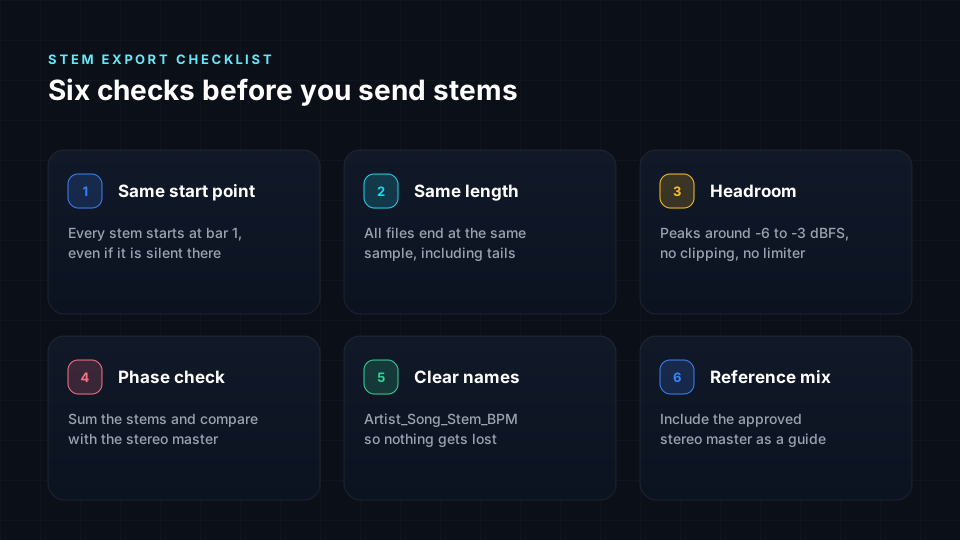
Always verify your exported stems:
Phase and Polarity
- Check for phase issues between stems
- Ensure stereo files maintain proper polarity
Start/End Alignment
- All stems should start at the same point
- Verify that the length matches your project
Headroom
- Leave adequate headroom (aim for -6dB to -3dB peaks)
- Avoid clipping in individual stems
Proper Naming Conventions
- Use clear, descriptive names
- Include instrument or sound source
- Consider numbering for organization
Packaging and Delivery
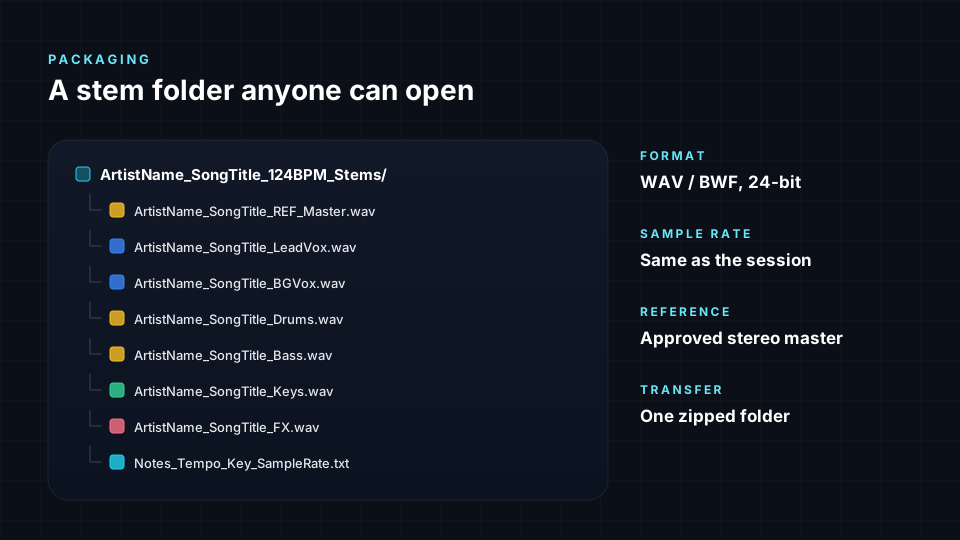
Folder Naming
- Use project name and date
- Include your name or studio
- Example: "ProjectName_Stems_2025-04-18_StudioName"
Include Reference Mix
- Always include a stereo mix as reference
- Helps verify stem alignment and sound
Secure File Transfer
- Use reliable file transfer services
- Consider compression for faster uploads
- Verify file integrity after transfer
Following these best practices ensures smooth collaboration and professional results in any audio production workflow.