Spatial9 Gravity Data Feed: Musical Intelligence for DAWs and Plugins
Spatial9 Engineering Team · · Updated · 16 min read
Key takeaways
- Gravity Data Feed is a musical-intelligence feed: a DAW or plugin sends session metadata and gets back a placement and movement plan.
- Requests never contain audio; they must declare audio_uploaded false, and confidence is always null.
- A model picks musical ideas; deterministic code applies locks and style limits and computes every coordinate and curve point.
- One query is one plan request covering up to 32 tracks and 128 beats; the free plan allows 1 query per second with bursts of 5 per account.
- Plans reach plugins four ways: a Gravity Profile (IEM StereoEncoder, ICST AmbiEncoder), a documented OSC route (SPAT Revolution, IRCAM Spat, L-ISA, HOLOPHONIX, d&b Soundscape, Spacemap Go and more), host automation, or ideas only for effects and synths.
- ADM-OSC is the most valuable profile still to build, because one profile could reach every tool that receives it.
- SPATAI from sonicLAB is a complementary AI motion tool: it can run side by side or through an AI assistant, but cannot take a Gravity Data Feed plan as input.
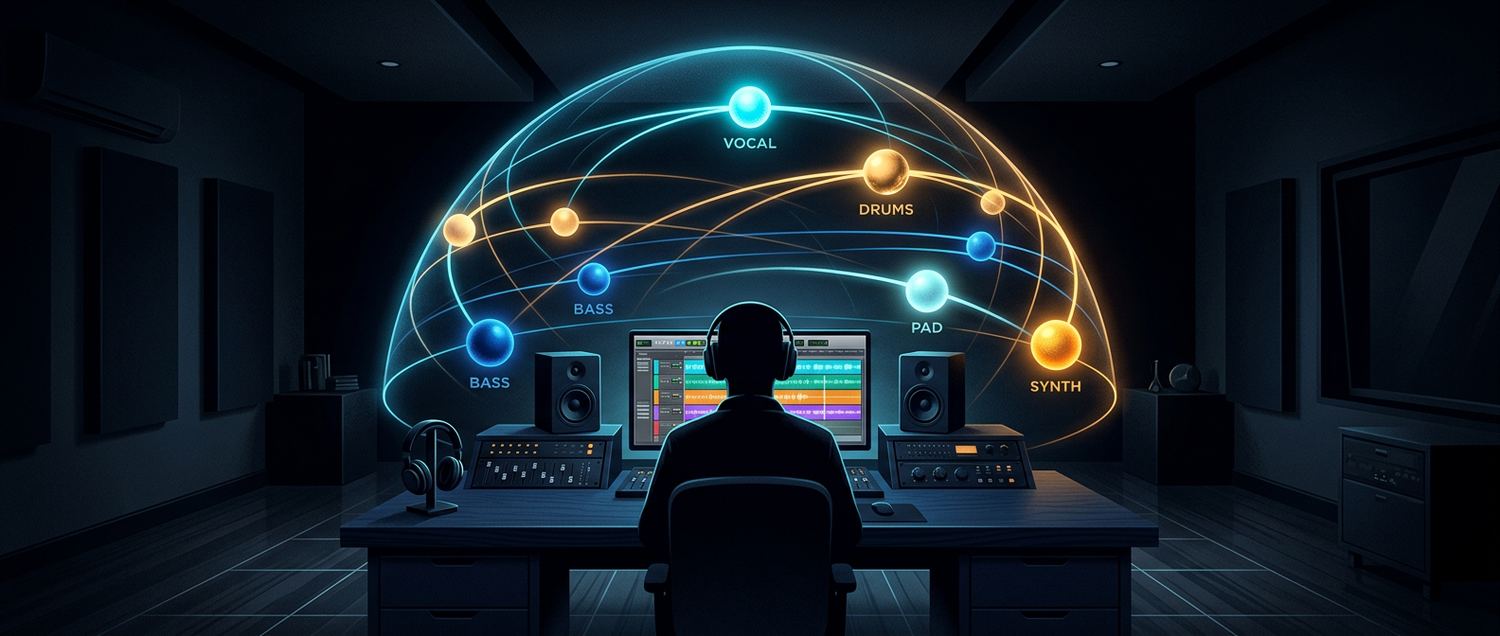
Mixing in 3D asks a question stereo never did: not only how loud and how bright each part should be, but where it should be and how it should move. Most spatial plugins give you the controls. None of them tell you what to do with them, or when. Gravity Data Feed fills that gap: it reads the shape of your song and proposes where things should go and how they should travel, in a form your DAW can show, preview and write.
This article explains what Gravity Data Feed is, what a DAW or plugin sends and gets back, what "1 QPS" means in practice, every way to connect, and exactly which parts are live today and which are still prototypes or plans.
What is Spatial9 Gravity Data Feed?
Gravity Data Feed is a planning service with an API. It is not a plugin and not a renderer. You call it when you want ideas for a section, and it answers with a plan your tools can act on. The name comes from the way a good immersive mix behaves: the lead vocal holds the centre like a planet, and the other parts orbit, rise and settle around it.
| Name | What it is | Status |
|---|---|---|
| Gravity Data Feed | The planning service and its API | Live |
| Gravity Connect | The ways in: REST, MCP and A2A, sharing one limit | Live |
| Gravity Profiles | Machine-readable descriptions of a plugin's position controls | Two profiles, not yet verified in a session |
| Gravity Link | A desktop bridge that relays plans to OSC plugins | Planned |
| Gravity Capture | A plugin that reads track context and writes plan automation in any host | Planned |
It covers six workflows: Place (static positions), Move (motion over time), Shape (effect ideas that support the movement), Explain (a reason for every change), Compare (restrained, expressive and cinematic alternatives) and Commit (automation actions, guarded so a stale plan is never written).
What does a DAW send?
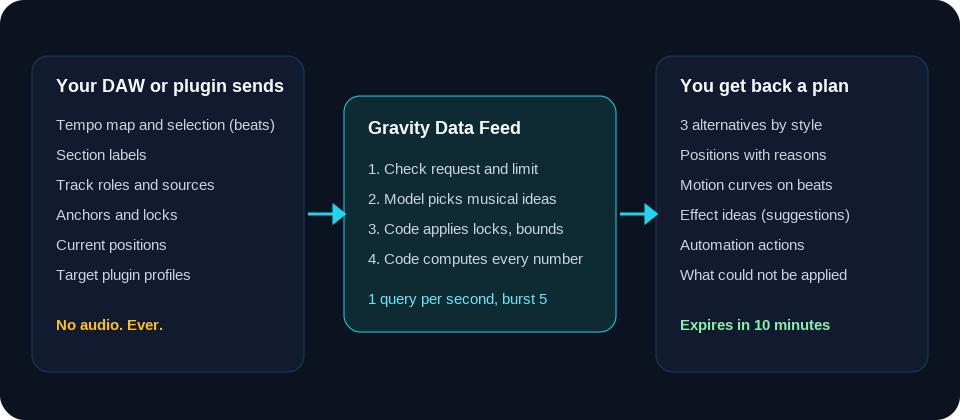
Only metadata. A request describes the session in musical terms:
| Field | Example |
|---|---|
| Tempo map | 120 BPM from beat 0 |
| Selection | Beats 64 to 96, the chorus |
| Sections | Verse, Chorus, Bridge with their beats |
| Tracks | Up to 32, each with a role such as lead_vocal or pad and where that label came from |
| Anchors and locks | Keep the vocal still; do not move the drums |
| Current positions | Azimuth, elevation and distance per track |
| Targets | Which plugin instance can receive each track's automation |
| Direction | Optional text, such as "open the chorus upward" |
| Privacy | audio_uploaded: false, required on every request |
Time is measured in quarter-note beats, so a plan stays in time if you change tempo. Positions use one neutral frame: azimuth 0 is straight ahead, positive is to the left, elevation positive is up, distance runs from 0 to 1.
What comes back?
Every plan is a proposal. Nothing changes in your session until your adapter writes it. A plan contains:
- Three alternatives, one per style, each with a one-line summary.
- A scene: every track's current and proposed position, whether it changed and why.
- Motions: shapes such as
rise,sweep,circle,spiral_uporfly_over, with start and end beats, intensity and curve points. - Effect ideas: reverb, delay, filter, width, dynamics or synth suggestions, always marked
executable: false. - Actions: the exact automation points for plugins that have a Gravity Profile, in the plugin's own units, with its OSC address.
- Unsupported actions: anything that could not be applied, and why, such as "this plugin has no distance control".
- Preconditions and expiry: the session revision the plan was made for, and a time ten minutes ahead after which it must not be written.
Two fields are deliberately empty. confidence is always null, because a made-up score would only look precise. audio_checks always says not_evaluated, because Gravity Data Feed never hears your audio.
How are the numbers made?
The model chooses musical ideas: lift the pad over the chorus, sweep the arpeggio from left to right, bring the guitar a little closer. Deterministic code does everything after that. It drops ideas that break a lock, clamps intensity and height to the style (one moving track and 35 degrees for restrained, up to six tracks and 85 degrees for cinematic), calculates each curve with fixed formulas and converts it to the target plugin's units. The same choice always produces the same numbers, and every change carries the reason the model gave.
What does 1 QPS mean?
QPS means queries per second. One query is one plan request, and a single request can cover up to 32 tracks and up to 128 beats.
Take an eight-bar chorus in 4/4 at 120 BPM. Eight bars are 32 beats, or 16 seconds of music. Asking Gravity Data Feed for a plan for all 12 tracks in that chorus is one query, not 12. If you do not like the result and ask again three times in quick succession, the burst of 5 absorbs it. What 1 QPS rules out is asking on every beat: at 120 BPM that would be two queries per second, and it is not how planning is meant to be used. Plan a section, preview it, then write it.
| Plan | Sustained | Burst | Monthly volume |
|---|---|---|---|
| Free | 1 query per second per account | 5 | Unlimited for now |
| Higher volume | By agreement | By agreement | Contact sales |
The limit is shared by every key and every protocol on the account. When you go over it, the API answers 429 with a Retry-After header saying how many seconds to wait. Checking a request with /validate, reading capabilities or profiles, and viewing your usage never count.
How do I connect?
| Route | Who it is for | Status |
|---|---|---|
REST API at spatial9.ai/api/gravity-feed/v1 | DAW scripts, plugins, servers | Live |
MCP tool gravity_feed_plan | ChatGPT, Claude and other MCP clients | Live |
A2A skill gravity_feed_plan | Other AI agents | Live |
| REAPER script for IEM StereoEncoder | REAPER users | Prototype, not yet tested in REAPER |
| Gravity Link desktop bridge | OSC plugins on your computer | Planned |
| Gravity Capture plugin | Any VST3, AU or AAX host | Planned |
Requests are idempotent: resend the same body with the same request_id after a network drop and you get the stored plan back without using your limit.
Which DAWs can use it?
Any DAW can reach the API, because a plan request is an HTTPS call. The difference is how much of the session a script can read and whether it can write automation back.
| DAW | Route | Status |
|---|---|---|
| REAPER | ReaScript reads tempo, regions and FX and writes envelopes in one undo step | Prototype |
| Ableton Live | Max for Live device or Remote Script | Documented route |
| Bitwig Studio | Controller API with remote-control pages | Documented route |
| FL Studio | Python MIDI scripting, live parameter changes | Documented route |
| Cubase | MIDI Remote API while recording automation | Documented route |
| Nuendo | MIDI Remote API, or the built-in OSC Object Position Tracking for the VST MultiPanner | Documented route |
| Pro Tools | Scripting SDK for session data, plugin-side writing | Documented route |
| Logic Pro | MIDI control of an Audio Unit spatial plugin (IEM has no AU build), or Gravity Capture when it ships | Documented route |
| Studio One, Reason, Cakewalk Sonar, GarageBand | Plugin-side routes | Documented route |
"Documented route" means the DAW's maker documents a way to do it; Spatial9 has not built or certified that adapter yet. The DAW guides explain each one.
Which plugins can receive a plan?
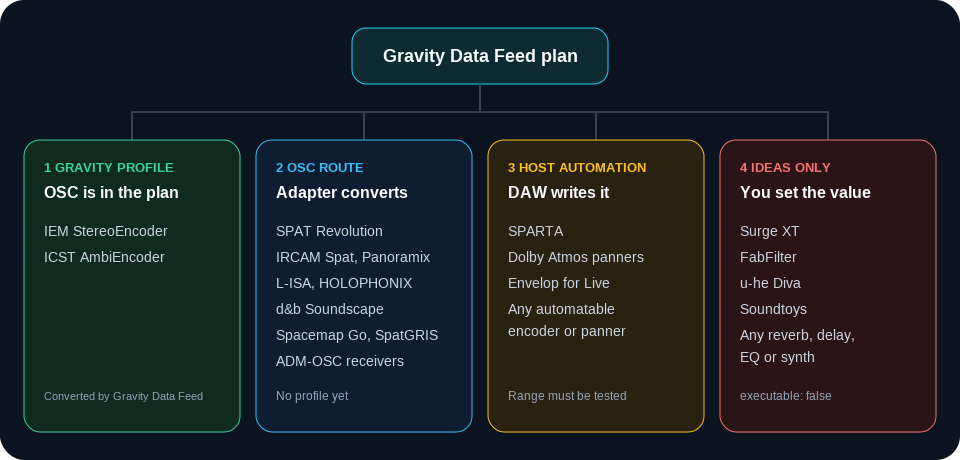
Almost any spatial plugin whose position can be automated, plus every effect and synth as ideas. What changes from plugin to plugin is how directly a plan can reach it. There are four routes, from the most direct to the least.
| Route | How the plan arrives | Who converts the numbers |
|---|---|---|
| 1. Gravity Profile | The plan already contains OSC messages for that plugin | Gravity Data Feed |
| 2. Documented OSC route | The plugin or engine publishes OSC addresses for position | Your adapter, until a profile exists |
| 3. Host automation | The DAW adapter writes the plugin's automatable position controls | The DAW adapter |
| 4. Ideas only | Effects and synths get effect_suggestions with executable: false | You |
Spatial plugins with a Gravity Profile
| Plugin | Maker | What the plan sends | Status |
|---|---|---|---|
| IEM StereoEncoder | IEM, Graz (free) | /StereoEncoder/azimuth and /StereoEncoder/elevation; no distance control | Documented route |
| ICST AmbiEncoder | ICST, Zurich (free) | /icst/ambi/sourceindex/xyz with a source index | Documented route |
Both say conversion_verified: false until a fixture test in a real session confirms that +90 degrees really means hard left.
Spatial plugins and engines with documented OSC
These publish OSC control of source positions, so an adapter can drive them today and a Gravity Profile can be added later.
| Tool | Maker | What it listens to | Status |
|---|---|---|---|
| IEM MultiEncoder | IEM (free) | /MultiEncoder/azimuth0 to azimuth63 and matching elevations, for up to 64 inputs | Documented route |
| ambiX encoder | Matthias Kronlachner (open source) | OSC input, set in the encoder's OSC settings | Documented route |
| SPAT Revolution | FLUX:: | OSC source control, plus DAW send plugins with automatable sources | Documented route |
| Spat and Panoramix | IRCAM | Fully controllable over OSC; IRCAM's ToscA plugin turns DAW automation into OSC and back | Documented route |
| L-ISA Controller and Studio | L-Acoustics | OSC source control with its own pan, width, distance and elevation model | Documented route |
| SpatGRIS and ControlGRIS | GRIS, Université de Montréal (free) | OSC from the ControlGRIS plugin or any sender | Documented route |
| HOLOPHONIX | HOLOPHONIX | OSC, and ADM-OSC from version 2.4.0 | Documented route |
| Soundscape (DS100) | d&b audiotechnik | OSC through coordinate mapping onto a positioning plane | Documented route |
| Spacemap Go | Meyer Sound | General-purpose OSC mapping, and a DAW plugin for X/Y position, spread and trajectories | Documented route |
| VST MultiPanner in Nuendo | Steinberg | Nuendo's built-in OSC Object Position Tracking, assigned per track | Documented route |
Live sound systems carry more risk than a studio: a wrong value moves sound in a room full of people. Use Gravity Data Feed to prepare a show, and keep a person in charge of anything that drives a live system.
One profile for many systems: ADM-OSC
ADM-OSC is an open, vendor-neutral way of sending object positions over OSC, based on the Audio Definition Model behind object formats such as Dolby Atmos. Its polar addresses are /adm/obj/n/azim (-180 to 180 degrees), /adm/obj/n/elev (-90 to 90 degrees) and /adm/obj/n/dist (0 to 1), or all three packed in /adm/obj/n/aed. Cartesian /adm/obj/n/x, y and z run from -1 to 1.
Those ranges match the ones Gravity Data Feed already plans in, so a single ADM-OSC profile could reach every console, engine and plugin that receives ADM-OSC, instead of one profile per product. It is the most valuable profile still to build. It does not exist yet, and each receiver will still need its own fixture test, because a shared protocol does not guarantee that every product reads directions the same way.
Spatial plugins reached through host automation
Any encoder or panner whose position can be automated can receive a plan through the DAW adapter, once its ranges and directions have been tested.
| Plugin | Maker | Notes | Status |
|---|---|---|---|
| AmbiENC, Panner, Binauraliser | SPARTA, Aalto University (free) | Per-source azimuth and elevation parameters | Documented route |
| Dolby Atmos Music Panner | Dolby | Object panner for DAWs without one built in | Documented route |
| Dolby Atmos Composer | Fiedler Audio | Places inputs as objects; movement is recorded as automation | Documented route |
| Envelop for Live (E4L) | Envelop (free) | Max for Live Ambisonic devices with automatable parameters | Documented route |
| Built-in object panners | Logic Pro, Pro Tools, Cubase, Nuendo | Automatable, but no profile describes them yet, so set them by hand from the plan | Manual today |
Effects and synths: ideas, not values
Every plan can include effect_suggestions of kind reverb, delay, filter, width, dynamics or synth. Each has a track, a section, an intent and a reason, and every one says executable: false: Gravity Data Feed never sends an effect value and never claims a value sounds better.
| Plugin | What to reach for | Control route |
|---|---|---|
| Surge XT (free) | Filter cutoff, unison width, effect mix | Built-in OSC or host automation |
| FabFilter Pro-Q 4 and Pro-R 2 | A band that makes room, reverb mix and decay | Host automation |
| u-he Diva | Cutoff and envelope across a build | Host automation |
| Soundtoys | EchoBoy for delay ideas, MicroShift for width, SuperPlate for reverb | Host automation |
| Any reverb, delay, EQ or synth | Whatever the suggestion's kind names | Host automation |
Legacy and conflicting tools
- dearVR is no longer developed and is listed as legacy.
- Facebook 360 Spatial Workstation is no longer developed; move its sessions to an actively maintained encoder.
- Controllers that also move sources, such as Sound Particles Space Controller OSC (a phone used as a pointer for Nuendo and SPAT Revolution), IRCAM ToscA playback, or SPATAI below, can fight a Gravity Data Feed adapter. Give each object one source of movement at a time.
The plugin guides cover setup for each one.
Can Gravity Data Feed work with SPATAI?
Yes, side by side and through an AI assistant, but not by feeding one into the other. SPATAI is an AI-assisted spatial tool from sonicLAB, designed by Sinan Bokesoy with Daito Manabe and Thierry Coduys, first released in February 2026 as VST3, VST2, AU and a standalone app. You describe a movement in words ("distribute objects randomly and circle each one around the elevation axis"), a language model turns that into a motion script for up to 64 objects, and SPATAI sends the motion over OSC or MIDI to spatializers such as IEM MultiEncoder or IRCAM Panoramix. Version 3 added its own MCP server for Claude Desktop and ChatGPT. Like Gravity Data Feed, it renders no audio.
The two tools answer different questions. Gravity Data Feed asks what the song needs, section by section; SPATAI asks how a described movement should look.
| Gravity Data Feed | SPATAI | |
|---|---|---|
| What it is | Planning service with an API | Plugin and standalone app |
| What you give it | Session metadata: tempo, sections, track roles, locks | A text prompt describing motion |
| What it knows about the song | Sections, roles and beats | The timeline region you play |
| What it returns | Three alternative plans with positions, beat-accurate curves, automation actions and reasons | A live stream of OSC or MIDI positions |
| Who computes the numbers | Deterministic code; the model only picks ideas | A motion script written from your prompt |
| AI assistants | gravity_feed_plan over MCP and A2A | Its own MCP server |
| Price | Free up to 1 query per second | Paid, one serial per computer; cloud tokens or a local model |
Three ways to combine them, none tested by Spatial9 yet:
- Side by side. Both can target IEM MultiEncoder. Let Gravity Data Feed place and move the core of the mix per section, and give SPATAI the effects or textures that need elaborate motion. Never let both move the same object.
- Through an AI assistant. Connect Claude Desktop to both MCP servers. The assistant asks Gravity Data Feed for a plan, then describes the movement for the chosen tracks to SPATAI.
- Direct feed: not available. SPATAI does not document an input for outside position plans, and as a sender it is not a target a Gravity Profile can describe.
If you meant SPAT Revolution from FLUX:: or Spat from IRCAM, both are in the OSC table above.
What do the status labels mean?
| Label | Meaning |
|---|---|
| Live | Running in production and covered by automated tests |
| Prototype | Code exists but has not been tested in the host |
| Documented route | The vendor documents a route; no certified Spatial9 adapter |
| Planned | Designed, not built |
| Legacy | Discontinued product, no new work |
A label only moves up after the test that justifies it has passed.
How do I start?
- Open the Gravity Data Feed page and try the playground. Signed out, it shows a labeled sample built by the real compiler; signed in, it makes live plans.
- Create a key in the Gravity Data Feed console.
- Follow the quickstart to send your first request, or install the REAPER prototype.
FAQ
Does Gravity Data Feed upload or listen to my audio?
No. Requests are metadata only and are rejected unless they declare audio_uploaded: false. Spatial9 stores a hash of the request, counts, timings and the returned plan.
Is Gravity Data Feed free?
Yes, up to 1 query per second per account with bursts of up to 5 and no monthly cap for now. Contact sales for more.
Does the AI decide the automation values?
No. The model picks musical ideas; deterministic code checks locks, style limits and plugin ranges and computes every value.
Can I use Gravity Data Feed from ChatGPT or Claude?
Yes. It is the gravity_feed_plan tool on the Spatial9 MCP server and a skill on the A2A agent. Both share your account's limit with the REST API. For the wider picture, see how Spatial9 connects to agent platforms.
What happens if my session changes after I ask for a plan?
The plan records the session revision it was built for and expires after ten minutes. A correct adapter refuses to write a stale plan and asks for a new one.
Which plugins work today without extra conversion?
IEM StereoEncoder and ICST AmbiEncoder: their plans already contain OSC messages. Their conversion is not verified yet, so test directions by ear first. Every other spatial plugin needs an adapter or host automation.
Can Gravity Data Feed work with SPATAI?
Side by side on different objects, or through an AI assistant connected to both MCP servers. SPATAI cannot take a Gravity Data Feed plan as input today.
Does Gravity Data Feed render or encode my mix?
No. Gravity Data Feed plans positions for the plugins you choose; your DAW and plugins make the sound. To deliver an immersive master, use Spatial9's spatial audio tools or your own renderer.
Sources
- Gravity Data Feed documentation
- Gravity Data Feed API reference
- IEM Plug-in Suite OSC documentation
- ICST, OSC syntax for the ICST AmbiEncoder plugin
- ADM-OSC specification
- HOLOPHONIX, ADM-OSC
- IRCAM Spat on the Ircam Forum
- ambiX plugins by Matthias Kronlachner
- d&b audiotechnik, The Soundscape Guide Book
- Meyer Sound, Spacemap Go user guide
- Sound Particles, Space Controller OSC reference manual
- sonicLAB, SPATAI
- REAPER ReaScript documentation
- Model Context Protocol
- Agent2Agent protocol
- Spatial9 Agent Integrations, Spatial9 Engineering: /blog/agentic-ai-platforms-a2a-spatial9-integrations
Product and company names in this article are trademarks of their respective owners and are used only to describe integrations. Vendor routes change; check each maker's documentation for current scripting and OSC support.