Spatial Audio & Immersive Music for Hyperpop: Complete Guide
Spatial9 Team · · Updated · 14 min read
Part of the series Spatial audio and immersive music by genre.
Key takeaways
- In a spatial hyperpop mix the pitched lead vocal, clipped drums and distorted 808 stay centred, while sugary synths sit raised on both sides and vocal stacks, glitch effects and bell arps fill the space behind the listener.
- Hyperpop glitch effects work best moving behind and to the side of the listener, because a sound arriving from its own direction is heard as a separate stream and stops cluttering the lead vocal.
- Bright synths and bell arps are the most convincing height layer in hyperpop, because the outer ear encodes elevation mainly in frequencies above roughly 4 kHz.
- The hyperpop immersion profile scores width 5, height 4, movement 5, low-end focus 5 and space 2 out of 5.
Hyperpop is internet-born pop pushed to extremes. It grew out of the 2010s scene around the London label PC Music and spread through online communities such as digicore, where producers working in bedrooms took pop hooks and made them louder, brighter and stranger. Its defining sound is easy to recognise: heavily pitched and auto-tuned vocals, distorted 808s, sugary supersaw and bell synths, chiptune-style arps, sudden genre switches and glitchy cut-up edits, all compressed until they almost break. In stereo that density can feel like a wall. Spatial audio gives each overloaded layer its own direction, so the chaos becomes thrilling instead of tiring. This guide covers how spatial audio for hyperpop works, where to place each element and how to make an immersive hyperpop mix. For the basics, see what spatial audio is.
Why hyperpop is ideal for spatial audio
Hyperpop stacks more bright, aggressive sounds into one track than almost any other pop style. Squeezed into two speakers, the vocal, synths and glitches all fight for the same upper mid range, and mixers often have to choose which one survives. Spread around the listener, every layer can stay loud and still be heard.
The rule: a solid core, a storm around it. The vocal and 808 hold the song together while the effects and synths are free to go wild.
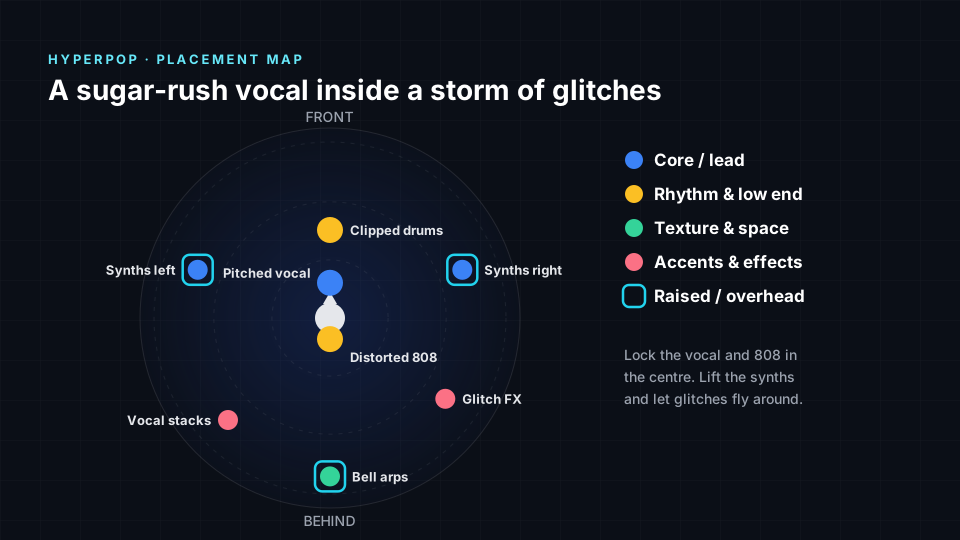
Immersive music for hyperpop: what listeners hear
- A vocal right in your face. The pitched lead stays close, clear and centred.
- Synths that tower over you. Sugary supersaws rise on both sides like a neon skyline.
- Glitches that dart past. Stutters, bitcrushed hits and reversed fragments fly behind and around you.
- An 808 that never lets go. The distorted low end stays heavy and steady wherever you sit.
Where to place each element in a hyperpop mix
| Element | Position | Height | Why it works |
|---|---|---|---|
| Pitched vocal | Front centre | Ear level | The hook and emotional focus |
| Clipped drums | Front centre | Ear level | Punchy, consistent impact |
| Distorted 808 | Centre | Ear level | Heavy and grounded |
| Synths left | Left | Raised | Half of the sugary chord wall |
| Synths right | Right | Raised | Mirrors the left side for width |
| Glitch FX | Behind right, moving | Ear level | Chaos that never blocks the vocal |
| Vocal stacks | Behind left | Ear level | Doubles and harmonies around you |
| Bell arps | Behind | Raised | Sparkling detail overhead |
The psychoacoustics behind Hyperpop placement
Every position in the table above follows how the ear and brain locate sound. Here is the reason behind the main choices for Hyperpop.
- The 808 stays centred. The fundamental of an 808 sits well below roughly 80 to 100 Hz, where the brain finds very little usable direction, so there is nothing to gain by moving it. Hyperpop 808s are often heavily distorted, though, and those added harmonics do carry direction. Keeping the whole 808, distortion included, in the centre stops the low end from pulling to one side.
- Vocal in front, synths and stacks elsewhere. The pitched lead vocal and bright synths crowd the same frequency band. Separating sounds in direction makes each one easier to hear, an effect known as spatial release from masking. Lifting the synths to the sides and moving the vocal stacks behind lets the lead cut through without extra harsh EQ.
- Synths and bell arps raised. The folds of the outer ear shape frequencies above about 4 kHz differently depending on elevation, which is how we hear height. Hyperpop synths and bells are packed with high treble, so they are the parts that sound genuinely overhead rather than simply louder.
- Glitch FX moving behind. The brain groups sounds into separate streams using cues such as pitch, timbre and location. Giving the cut-up stutters and bitcrushed hits their own moving position behind the listener keeps them heard as a separate layer of chaos, instead of fragments that seem to break the vocal itself.
The immersion profile for hyperpop
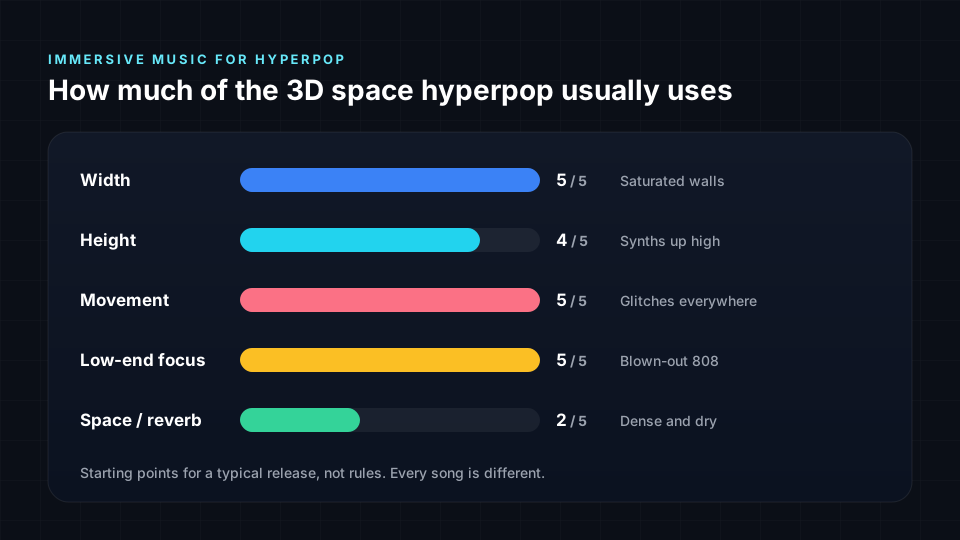
Width and movement are at maximum because the synths and glitches fill and cross the whole field. Low-end focus is at maximum too, thanks to the distorted 808. Space stays low: hyperpop is close, compressed and dry, so long reverbs would wash out its sharp edges.
Tips for an immersive hyperpop mix
- Anchor the vocal. It is the reference point for all the chaos, so keep it centred and close.
- Keep the 808 and its distortion together. Do not let the saturated harmonics drift away from the sub.
- Move the glitches, not the hook. Stutters and edits can fly around, but the main vocal and drums should never jump.
- Use the switches. When the track flips genre or drops into a new section, change the spatial picture too, for example by collapsing to mono and then exploding wide.
- Stay dry. Short, bright ambiences keep the hyperreal feel. Save big reverb for a single dramatic moment.
Dolby Atmos and object-based mixing for hyperpop
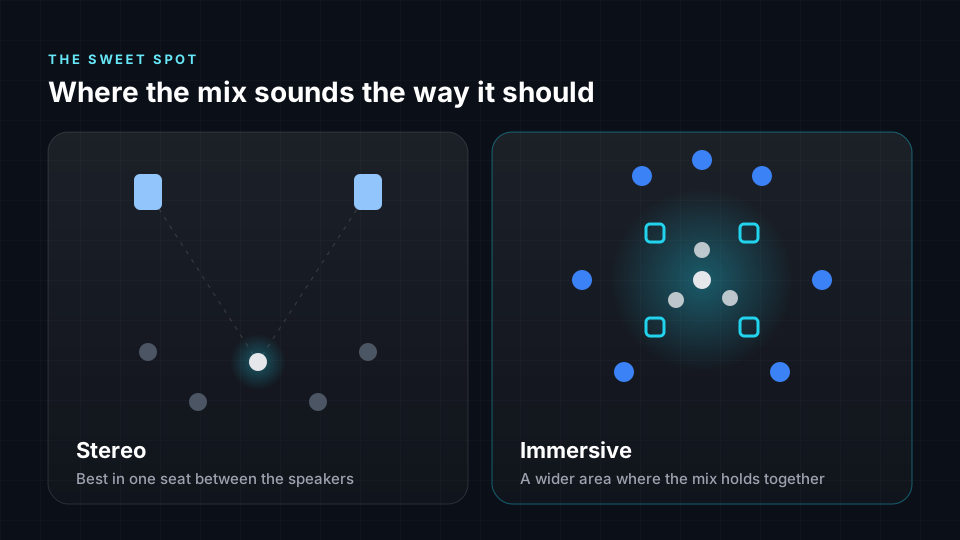
Dolby Atmos mixes hyperpop using a traditional channel bed alongside independent audio objects placed anywhere in the three-dimensional room. Most listeners will experience this mix on headphones through binaural rendering on services like Apple Music, Tidal and Amazon Music. Because each streaming platform handles spatial audio differently, careful planning is essential. Spatial9 helps you map out these placements to ensure your hyperpop track translates perfectly across every format, keeping the chaotic energy intact whether played on a full speaker system or standard earbuds.

How the Atmos plan differs from the placement map. The Atmos plan moves the distorted 808 from behind the listener to the front centre bed, as low frequencies must stay in the bed and LFE channel for solid bass management. The pitched vocal and clipped drums are pulled slightly off the front wall to create depth rather than sitting flat. The glitch effects still move, but they stay in the rear half of the room instead of crossing through the listener, ensuring they do not collapse in binaural fold-downs.
Beds and objects for each hyperpop element
| Element | Atmos role | Where it plays in 7.1.4 | Binaural mode | Why |
|---|---|---|---|---|
| Pitched vocal | Object | Ear level, front of the room, centre (X 0, Y 0.6, Z 0) | Near | Lead vocal stays anchored in the front centre to drive the track. |
| Clipped drums | Object, small size | Ear level, front of the room, centre (X 0, Y 0.7, Z 0) | Mid | Placed slightly behind the vocal to create front-to-back depth on the stage. |
| Distorted 808 | Bed | Centre plus LFE (C + LFE) | Off | Low frequencies belong in the front bed and LFE for solid playback. |
| Synths left | Object, medium size | Raised, front of the room, far left (X -0.8, Y 0.5, Z 0.6) | Mid | Lifted and pushed wide to wrap around the listener without masking the vocal. |
| Synths right | Object, medium size | Raised, front of the room, far right (X 0.8, Y 0.5, Z 0.6) | Mid | Mirrors the left synth to maintain a balanced and wide stereo image. |
| Glitch FX | Object, moving | Ear level, rear of the room, far right (X 0.8, Y -0.5, Z 0.2). Moving: Darts across the rear wall to add chaotic movement between vocal phrases, ending at ear level, rear of the room, far left | Far | Keeps erratic sounds away from the main stage so they remain distinct. |
| Vocal stacks | Object, medium size | Ear level, rear of the room, left (X -0.7, Y -0.4, Z 0) | Mid | Placed in the rear sides to support the lead without crowding the front. |
| Bell arps | Object | Overhead, rear of the room, centre (X 0, Y -0.6, Z 0.8) | Far | Raised behind the listener to provide sparkling detail that floats above the mix. |
Dolby Atmos settings for hyperpop
- LFE. The LFE channel exists only in the bed, so route your 808 and kick here and rely on bass management for any low end in objects.
- Object size. Keep lead vocals and percussion set to a point size for sharp focus, while using a medium size for wide synth layers to spread them across multiple speakers.
- Height use. Reserve the height channels for reverb, pads and overhead sweeps, as dry melodic parts placed fully overhead lose focus on headphones.
- Binaural render modes. Set the 808 to off for a solid centre, use near for the intimate lead vocal, and select far for distant effects and ambience.
- Hyperpop density. Automate object positions sparingly for glitch effects and risers, ensuring the dense core of the track remains stable and punchy.
Hyperpop across immersive formats
| Format | How it carries sound | What it means for hyperpop |
|---|---|---|
| Dolby Atmos | Hybrid: a 7.1.2 channel bed plus up to 118 objects placed with X, Y and Z metadata | A Dolby Atmos hyperpop mix combines a 7.1.2 bed for the heavy low end with up to 118 objects for precise synth placement. |
| Sony 360 Reality Audio | Object-based, built on MPEG-H 3D Audio: every sound is an object on a sphere | Sony 360 Reality Audio uses no channel bed, so every hyperpop element becomes an object placed on a sphere around the listener. |
| MPEG-H 3D Audio | Channels, objects and Higher Order Ambisonics in one stream, with optional listener control | MPEG-H 3D Audio carries channels and objects, allowing broadcasters to let listeners adjust the level of the lead vocal against the backing. |
| Auro-3D | Channel-based: a height layer above 5.1 or 7.1, with an optional overhead channel | Auro-3D relies on fixed height channels rather than objects, meaning your overhead bell arps and synth layers are routed to a static upper layer. |
| Eclipsa Audio (IAMF) | Channel-based and scene-based (Ambisonics) audio elements; no objects | Eclipsa Audio uses IAMF which lacks audio objects, so your Atmos hyperpop mix must be rendered to channels or Ambisonics before delivery. |
| Ambisonics | Scene-based: the whole sound field, decoded to any speaker layout or to headphones | Ambisonics stores the entire hyperpop sound field as spherical harmonics, capturing the chaotic width and movement for decoding to any speaker layout. |
| ADM BWF | Open exchange file (ITU-R BS.2076 metadata in a BW64 file) for channels, objects and scenes | The final hyperpop mix is delivered as an ADM BWF file containing all audio and metadata required by streaming services. |
Delivery checklist for a hyperpop Dolby Atmos release
- Master file. ADM BWF at 48 kHz and 24-bit, with no more than 128 channels: a 10-channel 7.1.2 bed plus up to 118 objects.
- Loudness. Integrated loudness no higher than -18 LKFS and true peak no higher than -1 dBTP, measured to ITU-R BS.1770.
- Binaural metadata. Set Off, Near, Mid or Far for every bed and object. Masters with everything left on Off are rejected.
- Re-renders. Listen to the 5.1, stereo and binaural re-renders before delivery, because most people will hear one of them.
Always check the binaural render on headphones to ensure the heavy 808 distortion and bright synth layers do not mask the lead vocal.
How to make immersive hyperpop from stereo
Spatial9 can create spatial audio from a stereo track in a few steps:
- Upload your stereo master or your stems.
- Spatial9's AI separates and places each part, keeping the vocal and 808 centred while spreading synths and glitches around you.
- Preview it in binaural on headphones.
- Export Eclipsa Audio, ADM, binaural or Ambisonics.
- Publish a video. Create a YouTube-ready video with your immersive audio and publish it directly.
For related guides, read spatial audio for future bass and spatial audio for chiptune. Every guide is listed in spatial audio and immersive music by genre.
Frequently asked questions
Can I make a hyperpop mix in Dolby Atmos or Eclipsa Audio?
Yes, you can make a hyperpop mix in Dolby Atmos. The format is ideal for separating dense synths and vocals. Remember that Dolby Atmos and Eclipsa Audio require separate deliveries, as Eclipsa is built on IAMF and does not support audio objects. You must also test your mix specifically for Apple Music. Apple applies its own spatial renderer to the Dolby Atmos file, which can sound different from the standard Dolby binaural render, especially with bright hyperpop transients.
Should hyperpop elements be beds or objects in Dolby Atmos?
In a hyperpop mix, use the bed for your foundational elements and objects for everything else. The distorted 808 belongs in the front bed and LFE channel to ensure solid, phase-coherent low end across all playback systems. The lead vocal, clipped drums, wide synths and glitch effects should be objects. This allows you to pull the vocal off the wall for depth, push the synths wide and automate the glitches to dart around the room.
Does a hyperpop Dolby Atmos mix also work for Sony 360 Reality Audio and MPEG-H?
A Dolby Atmos mix cannot be used directly for Sony 360 Reality Audio or MPEG-H 3D Audio. Sony 360 Reality Audio is built on MPEG-H but uses a purely object-based sphere with no channel bed, meaning your 808 bed must be converted into objects. While MPEG-H supports both channels and objects, it requires its own specific authoring process. You will need to translate your Atmos panning decisions into the dedicated tools for each format.
Is spatial audio good for hyperpop?
Yes. Hyperpop packs many bright, loud layers into one track, and spreading them around the listener lets each one be heard without losing the intensity.
Where should glitch effects go in an immersive hyperpop mix?
Behind and to the sides of the listener, ideally moving. That keeps the chaos exciting while the vocal stays clear in front.
Should the pitched vocal move around?
No. The lead vocal is the hook that holds the song together. Keep it centred and close, and let vocal stacks, chops and effects do the moving.
Can I convert a finished hyperpop track to spatial audio?
Yes. Spatial9 uses AI to generate an immersive mix from a stereo master and exports it as Eclipsa Audio, ADM, binaural or Ambisonics.
Does immersive hyperpop work on normal headphones?
Yes. The mix is rendered binaurally, so the synths and glitches surround you on any regular headphones.
Dolby and Dolby Atmos are trademarks of Dolby Laboratories. 360 Reality Audio, Auro-3D and other format names are trademarks of their respective owners. Spatial9 is not affiliated with or endorsed by Dolby Laboratories or these companies.
Sources
- Blauert, J. (1997). Spatial Hearing: The Psychophysics of Human Sound Localization, revised edition. MIT Press. Low-frequency, elevation, distance and motion cues.
- Mills, A. W. (1958). On the minimum audible angle. Journal of the Acoustical Society of America, 30(4), 237-246.
- Hebrank, J. and Wright, D. (1974). Spectral cues used in the localization of sound sources on the median plane. Journal of the Acoustical Society of America, 56(6), 1829-1834.
- Bronkhorst, A. W. (2000). The cocktail party phenomenon: a review of research on speech intelligibility in multiple-talker conditions. Acta Acustica united with Acustica, 86, 117-128.
- Litovsky, R. Y., Colburn, H. S., Yost, W. A. and Guzman, S. J. (1999). The precedence effect. Journal of the Acoustical Society of America, 106(4), 1633-1654.
- Barron, M. and Marshall, A. H. (1981). Spatial impression due to early lateral reflections in concert halls. Journal of Sound and Vibration, 77(2), 211-232.
- Neuhoff, J. G. (1998). Perceptual bias for rising tones. Nature, 395, 123-124.
- Bregman, A. S. (1990). Auditory Scene Analysis: The Perceptual Organization of Sound. MIT Press.
- Dolby Laboratories. Dolby Atmos for content creators. Dolby Professional. professional.dolby.com. 7.1.2 bed, audio objects with X, Y, Z metadata and renderer re-renders.
- Production Expert. Mixing Dolby Atmos on headphones: a professional guide. production-expert.com. Binaural render modes Off, Near, Mid and Far.
- Universal Music Group. Content Guide: Dolby Atmos servicing asset specifications. contentguide.universalmusic.com. ADM BWF, 48 kHz, 24-bit, 128 channels, binaural metadata and -18 LKFS.
- International Telecommunication Union. Recommendation ITU-R BS.2076: Audio Definition Model.
- International Telecommunication Union. Recommendation ITU-R BS.2088: Long-form file format for the international exchange of audio programme materials with metadata (BW64).
- International Telecommunication Union. Recommendation ITU-R BS.2051: Advanced sound system for programme production.
- International Telecommunication Union. Recommendation ITU-R BS.1770: Algorithms to measure audio programme loudness and true-peak audio level.
- European Broadcasting Union. ADM related standards. adm.ebu.io.
- ISO/IEC 23008-3. Information technology. High efficiency coding and media delivery in heterogeneous environments. Part 3: 3D audio (MPEG-H 3D Audio).
- Herre, J., Hilpert, J., Kuntz, A. and Plogsties, J. (2015). MPEG-H 3D Audio: the new standard for coding of immersive spatial audio. IEEE Journal of Selected Topics in Signal Processing, 9(5), 770-779.
- Sony Corporation. 360 Reality Audio licensing. sony.co.jp. Object-based spatial audio based on MPEG-H 3D Audio.
- Alliance for Open Media. Immersive Audio Model and Formats (IAMF). aomediacodec.github.io/iamf. Channel-based and scene-based audio elements.
- Zotter, F. and Frank, M. (2019). Ambisonics: A Practical 3D Audio Theory for Recording, Studio Production, Sound Reinforcement, and Virtual Reality. Springer.
Put your listeners inside the storm
Upload a track to Spatial9 and hear your synths and glitches surround you in minutes. Then export it or publish it straight to YouTube.